


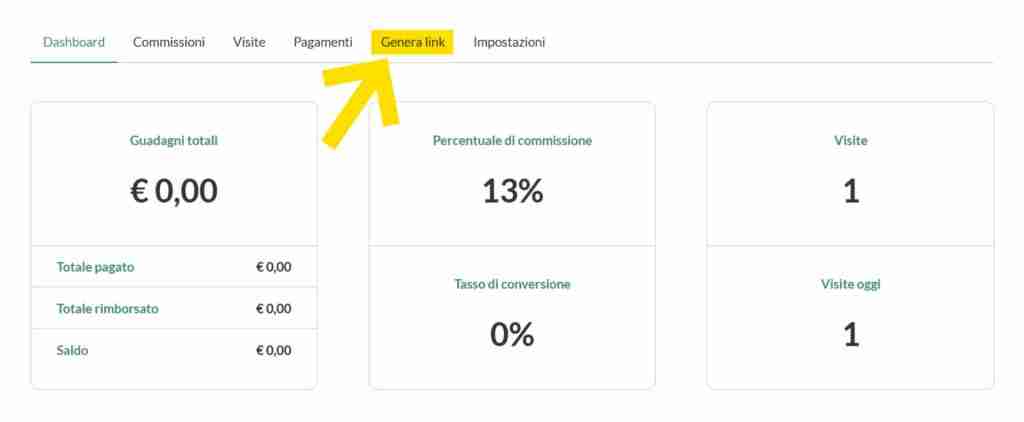
Your dashboard consists of 5 tabs that contain the different affiliate control elements.
Dashboard contains a summary of all the most important information, Commissions contains a list of commissions earned, Visits is a history of visits made through your link, Payments lists payments received, Generate Links allows you to create your own affiliate links, and Settings allows you to set up your payment methods.
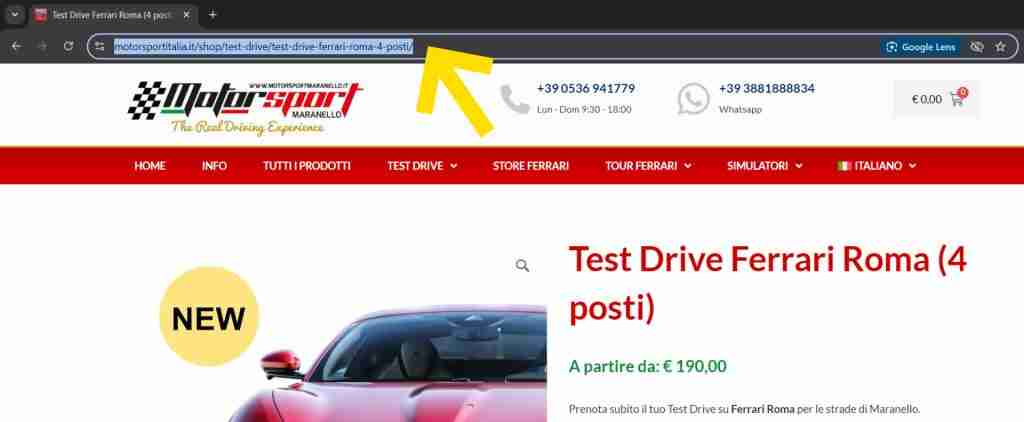
As a first step, go to the web page that contains the specific product on which you want to create the affiliate link. Then select the web page address in the browser bar and copy it via context menu or keyboard shortcut (ctrl + c /⌘ + c).
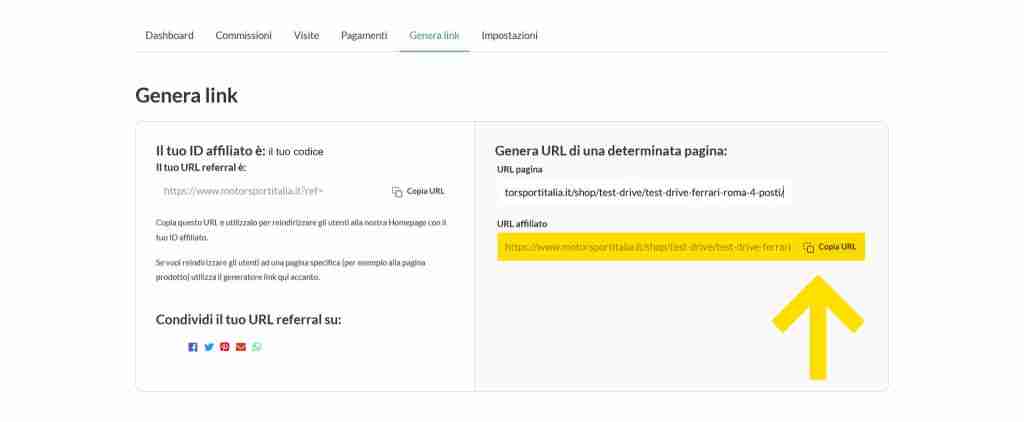
Go back to your dashboard and click the Generate Links tab.
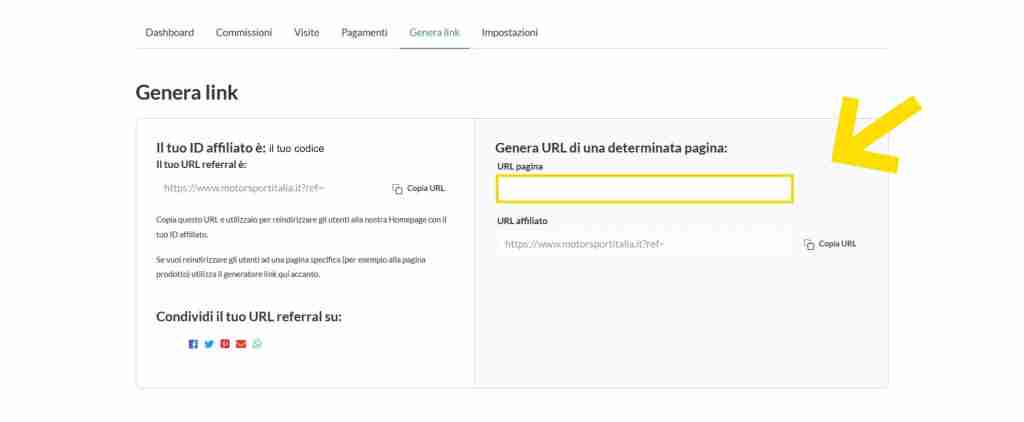
Paste your product link into the bar on the right, highlighted in yellow.
It will automatically generate, in the bar below, the product link with your affiliate code. You just have to share it with your friends and followers!
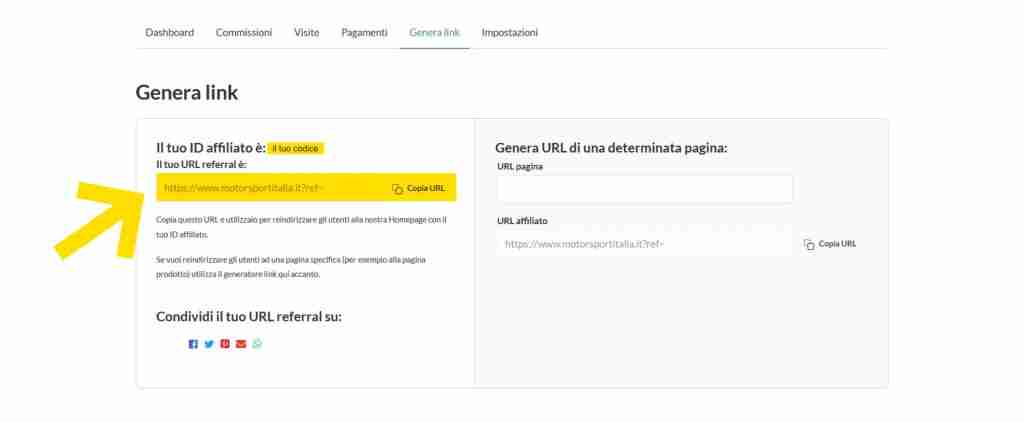
As a Motorsport affiliate you have your own affiliate ID and custom generic link. In the aforementioned Generate Links tab, in the box on the left, you will find your affiliate ID at the top and just below your referreal URL that you can copy and share to your friends and followers. The link will lead to the Motorsport site, not to a specific product.
The Dashboard tab contains a summary of all the most important information, let’s find out together what it is:
Reaching Maranello is very easy and you can do it in different ways and by different means. Select below and follow the suggestions.
Maranello is located near major communication routes such as the via Emilia which runs through the entire Emilia-Romagna region, connecting Piacenza and Rimini, and to two major axes of the Italian highway network: the “Autostrada del Sole” or A1 (Milan-Naples) and the Brenner freeway o A22 which connects the Po Valley with Austria and Germany.
For those arriving by car, Maranello is about 20 minutes from the Modena Sud and Modena Nord exits of the highway.
For those arriving from Modena Nord, simply take the ring road following the signs for Sassuolo; continue to the Fiorano traffic circle and take the Strada Pedemontana, direction Vignola. We recommend exiting at the junction for Maranello, in the vicinity of the Ferrari factories.
For those arriving from south Modena, however, keep to the right at the exit of the tollbooth, putting on Via Vignolese, in the direction of Modena. Continue for about 7 km and at the traffic circle “del grappolo d’uva” take the Nuova Estense state road in the direction of Pavullo – Abetone. Once at the traffic circle in Pozza di Maranello, turn right onto Via Vignola following the signs for the Ferrari Museum.
Motorists can turn to ACI (Automobile Club of Italy) for any information regarding mobility and traffic. The Maranello delegation is located at 34 Trebbo Street (Tel. 0536 941035).
To travel always informed you can tune in to radio stations
103.3 Mhz (Isoradio)
; on
102.5 (RTL)
, which provide about every half hour updates for the traffic situation on highways; or the Autostrade per l’Italia Viability call center is available 24 hours a day at 840-04 21 21.
TAXI
From the Modena FFSS train station, it is also possible to reach Maranello by cab. Cab service by various local consortia guarantees tourists a fixed fare for the route from Modena’s FFSS train station to the Ferrari Museum at 43 Dino Ferrari Street.
To book a cab contact:
COTAMO:
059 374242
FROM MODENA
For those arriving by train, the nearest FFSS train station to Maranello is Modena, in Piazza Dante. Every 5 to 10 minutes, city buses depart from the square at the station entrance, connecting the train station with the city center. In particular, buses No. 7 and 11 stop at the Modena Bus Station on Via Molza, from which one can take the extra-urban connection to Maranello.
There are two suburban lines to get to Maranello: the one that goes through Montale (
line 820
), running along the Nuova Estense to Pozza; and the one that passes through Formigine (
line 800
), along Via Giardini, going in the direction of Abetone or Serramazzoni.
The terminus can be reached from Grizzaga Street, at the rear entrance of the Ferrari factory. The nearest stop to the Ferrari Museum is on Via Abetone Inferiore, at the Esso gas station.
Depending on stops and traffic intensity, rides take 25-40 minutes.
From the Modena train station, it is also possible to use the FER Modena-Sassuolo railway line, which stops at the Policlinico, the “Little Station” (Piazzale Manzoni), and the New Civic Hospital in Baggiovara, and continues the route via the towns of Casinalbo and Formigine. The route has a duration of about 30 minutes.
”
Modena – Sassuolo
Once you arrive at the Sassuolo train station, you can reach Maranello (which is about 8 km away) using the
suburban line no. 640
(in the direction of Vignola).
More information on the
website of Seta
, a city and suburban transportation company in Modena.
FROM BOLOGNA
Those arriving from Bologna by train can get to Maranello via Modena, or by using the suburban train service, which runs from Bologna Centrale train station to Vignola train station (15 km from Maranello). The route stops at all stations and has a duration of about 1 hour (ATC pricing is in effect on this route. You can check rates and outlets directly on the website
TPER
).
”
Bologna – Vignola
Once in Vignola, from the Autostazione (in Via Montanara) it is possible to take the connection to Maranello, extra-urban line 640-direction Sassuolo. The run has a duration of about 20 minutes.
Leaving from theModena Bus Station on Viale Molza, there are two extra-urban lines to get to Maranello: the one that passes through Montale (line 820), running along the Nuova Estense to Pozza; and the one that passes through Formigine (line 800), along the Via Giardini, heading towards Abetone or Serramazzoni.
The terminus is at the new terminal on Grizzaga Street, behind the Ferrari factory. The closest stop to the Ferrari Museum is on Via Abetone Inferiore, at the Esso gas station.
Depending on stops and traffic intensity, rides take 25-40 minutes.
”
Line 800 Modena
– Maranello (via Formigine)
”
Line 820 Modena
– Maranello (via Montale)
Suburban tickets can be purchased at SETA counters or at authorized retailers (such as tobacconists, bars or newsstands).
The official ticket office in Maranello is located at the Terminal Cubo bar on Via Grizzaga, 0536 943688
From the Maranello terminus, it is also possible to reach important mountain resorts in the Tuscan-Emilian Apennines, such as Pavullo, Serramazzoni, Sestola and Pievepelago.
For more information:
SETA (Società Emiliana Trasporti Autofiloviari)
Strada Sant’Anna, 210 – 41122 Modena
Tel. 840000216
Web site: www.setaweb.it
FROM BOLOGNA
Those arriving from Bologna can get to Maranello by going to Modena by train, or by taking
the 671 Bologna line
– Casalecchio – Bazzano – Vignola, which runs from the Bologna bus station to Vignola. The ride takes about 1 hour.
Once you arrive in Vignola, from the bus station (on Via Montanara) you can take the connection to Maranello,
extra-urban line 640
– Sassuolo direction. The run has a duration of about 20 minutes.
Transfer between Ferrari Museum and Enzo Ferrari House Museum
It is also possible to reach Maranello and the Ferrari Museum thanks to the connecting service between the Modena train station and the Ferrari Museum in Maranello. The special shuttle bus operates for museum visitors only and every hour and a half. The special shuttle bus also connects the Ferrari Museum in Maranello with the new Casa Enzo Ferrari Museum in Modena, about 1 km from the station. The shuttle bus service is reserved for ticket holders of one of the Museums (Casa Enzo Ferrari – Ferrari Museum) and has an additional cost. To access the shuttle, you must present the reservation voucher sent by e-mail or given to the front desk of the Ferrari Maranello Museum and/or Museo Casa Enzo Ferrari, and arrange to pay the ticket directly to the driver in cash or online and at the museum ticket office with a credit card.
Shuttle bus ticket
– For those visiting both museums: €10.00 round trip (€6.00 one way)
– For those visiting only one of the museums: €11.00 round trip (€6.00 one way)
Shuttle schedule:
Modena-Maranello
(FFSS Station → Museo Casa Enzo Ferrari → Ferrari Museum (Maranello) )
09:50 – 11:20 – 12:50 – 14:20 – 15:50 – 17:20
Maranello-Modena
(Ferrari Museum (Maranello) → Museo Casa Enzo Ferrari → FFSS Station)
10:30 – 12:00 – 13:30 – 15:00 – 16:30 – 18:30
USEFUL LINKS.
”
Ferrari Museum Maranello
”
Enzo Ferrari House Museum Modena
Reaching Maranello is very easy and you can do it in different ways and by different means. Select below and follow the suggestions.
Maranello is located near major communication routes such as the via Emilia which runs through the entire Emilia-Romagna region, connecting Piacenza and Rimini, and to two major axes of the Italian highway network: the “Autostrada del Sole” or A1 (Milan-Naples) and the Brenner freeway o A22 which connects the Po Valley with Austria and Germany.
For those arriving by car, Maranello is about 20 minutes from the Modena Sud and Modena Nord exits of the highway.
For those arriving from Modena Nord, simply take the ring road following the signs for Sassuolo; continue to the Fiorano traffic circle and take the Strada Pedemontana, direction Vignola. We recommend exiting at the junction for Maranello, in the vicinity of the Ferrari factories.
For those arriving from south Modena, however, keep to the right at the exit of the tollbooth, putting on Via Vignolese, in the direction of Modena. Continue for about 7 km and at the traffic circle “del grappolo d’uva” take the Nuova Estense state road in the direction of Pavullo – Abetone. Once at the traffic circle in Pozza di Maranello, turn right onto Via Vignola following the signs for the Ferrari Museum.
Motorists can turn to ACI (Automobile Club of Italy) for any information regarding mobility and traffic. The Maranello delegation is located at 34 Trebbo Street (Tel. 0536 941035).
To travel always informed you can tune in to radio stations
103.3 Mhz (Isoradio)
; on
102.5 (RTL)
, which provide about every half hour updates for the traffic situation on highways; or the Autostrade per l’Italia Viability call center is available 24 hours a day at 840-04 21 21.
TAXI
From the Modena FFSS train station, it is also possible to reach Maranello by cab. Cab service by various local consortia guarantees tourists a fixed fare for the route from Modena’s FFSS train station to the Ferrari Museum at 43 Dino Ferrari Street.
To book a cab contact:
COTAMO:
059 374242
FROM MODENA
For those arriving by train, the nearest FFSS train station to Maranello is Modena, in Piazza Dante. Every 5 to 10 minutes, city buses depart from the square at the station entrance, connecting the train station with the city center. In particular, buses No. 7 and 11 stop at the Modena Bus Station on Via Molza, from which one can take the extra-urban connection to Maranello.
There are two suburban lines to get to Maranello: the one that goes through Montale (
line 820
), running along the Nuova Estense to Pozza; and the one that passes through Formigine (
line 800
), along Via Giardini, going in the direction of Abetone or Serramazzoni.
The terminus can be reached from Grizzaga Street, at the rear entrance of the Ferrari factory. The nearest stop to the Ferrari Museum is on Via Abetone Inferiore, at the Esso gas station.
Depending on stops and traffic intensity, rides take 25-40 minutes.
From the Modena train station, it is also possible to use the FER Modena-Sassuolo railway line, which stops at the Policlinico, the “Little Station” (Piazzale Manzoni), and the New Civic Hospital in Baggiovara, and continues the route via the towns of Casinalbo and Formigine. The route has a duration of about 30 minutes.
”
Modena – Sassuolo
Once you arrive at the Sassuolo train station, you can reach Maranello (which is about 8 km away) using the
suburban line no. 640
(in the direction of Vignola).
More information on the
website of Seta
, a city and suburban transportation company in Modena.
FROM BOLOGNA
Those arriving from Bologna by train can get to Maranello via Modena, or by using the suburban train service, which runs from Bologna Centrale train station to Vignola train station (15 km from Maranello). The route stops at all stations and has a duration of about 1 hour (ATC pricing is in effect on this route. You can check rates and outlets directly on the website
TPER
).
”
Bologna – Vignola
Once in Vignola, from the Autostazione (in Via Montanara) it is possible to take the connection to Maranello, extra-urban line 640-direction Sassuolo. The run has a duration of about 20 minutes.
Leaving from theModena Bus Station on Viale Molza, there are two extra-urban lines to get to Maranello: the one that passes through Montale (line 820), running along the Nuova Estense to Pozza; and the one that passes through Formigine (line 800), along the Via Giardini, heading towards Abetone or Serramazzoni.
The terminus is at the new terminal on Grizzaga Street, behind the Ferrari factory. The closest stop to the Ferrari Museum is on Via Abetone Inferiore, at the Esso gas station.
Depending on stops and traffic intensity, rides take 25-40 minutes.
”
Line 800 Modena
– Maranello (via Formigine)
”
Line 820 Modena
– Maranello (via Montale)
Suburban tickets can be purchased at SETA counters or at authorized retailers (such as tobacconists, bars or newsstands).
The official ticket office in Maranello is located at the Terminal Cubo bar on Via Grizzaga, 0536 943688
From the Maranello terminus, it is also possible to reach important mountain resorts in the Tuscan-Emilian Apennines, such as Pavullo, Serramazzoni, Sestola and Pievepelago.
For more information:
SETA (Società Emiliana Trasporti Autofiloviari)
Strada Sant’Anna, 210 – 41122 Modena
Tel. 840000216
Web site: www.setaweb.it
FROM BOLOGNA
Those arriving from Bologna can get to Maranello by going to Modena by train, or by taking
the 671 Bologna line
– Casalecchio – Bazzano – Vignola, which runs from the Bologna bus station to Vignola. The ride takes about 1 hour.
Once you arrive in Vignola, from the bus station (on Via Montanara) you can take the connection to Maranello,
extra-urban line 640
– Sassuolo direction. The run has a duration of about 20 minutes.
Transfer between Ferrari Museum and Enzo Ferrari House Museum
It is also possible to reach Maranello and the Ferrari Museum thanks to the connecting service between the Modena train station and the Ferrari Museum in Maranello. The special shuttle bus operates for museum visitors only and every hour and a half. The special shuttle bus also connects the Ferrari Museum in Maranello with the new Casa Enzo Ferrari Museum in Modena, about 1 km from the station. The shuttle bus service is reserved for ticket holders of one of the Museums (Casa Enzo Ferrari – Ferrari Museum) and has an additional cost. To access the shuttle, you must present the reservation voucher sent by e-mail or given to the front desk of the Ferrari Maranello Museum and/or Museo Casa Enzo Ferrari, and arrange to pay the ticket directly to the driver in cash or online and at the museum ticket office with a credit card.
Shuttle bus ticket
– For those visiting both museums: €10.00 round trip (€6.00 one way)
– For those visiting only one of the museums: €11.00 round trip (€6.00 one way)
Shuttle schedule:
Modena-Maranello
(FFSS Station → Museo Casa Enzo Ferrari → Ferrari Museum (Maranello) )
09:50 – 11:20 – 12:50 – 14:20 – 15:50 – 17:20
Maranello-Modena
(Ferrari Museum (Maranello) → Museo Casa Enzo Ferrari → FFSS Station)
10:30 – 12:00 – 13:30 – 15:00 – 16:30 – 18:30
USEFUL LINKS.
”
Ferrari Museum Maranello
”
Enzo Ferrari House Museum Modena

